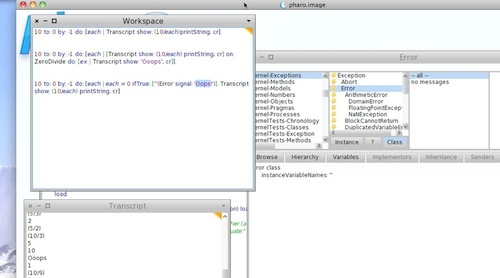
Today's Smalltalk 4 You looks at using exceptions (raising them) in Pharo Smalltalk. If you have trouble viewing it here in the browser, you can also navigate directly to YouTube. To watch now, click on the image below:
If you have trouble viewing that directly, you can click here to download the video directly. If you need the video in a Windows Media format, then download that here.
Today's Smalltalk 4 You looks at client level HTTP (specifically, get) in VA Smalltalk. If you have trouble viewing it here in the browser, you can also navigate directly to YouTube. To watch now, click on the image below:
If you have trouble viewing that directly, you can click here to download the video directly. If you need the video in a Windows Media format, then download that here.
You can also watch it on YouTube:
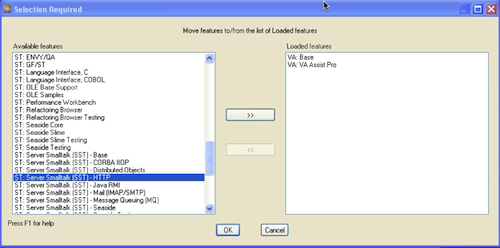
Today we'll take a look at doing HTTP queries in VA Smalltalk. To get started, you'll need to load the SST (server Smalltalk) packages for HTTP:
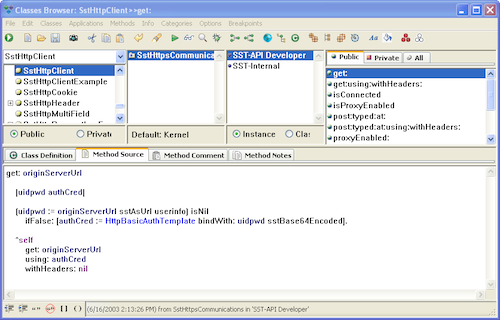
All we'll be looking at today is the client side of HTTP, but you need to server package to get that in the image. Once you do that, take a look at class SstHttpClient:
A quick look at the APIs makes it appear that all you need to do is create an instance and start using #get:, but it's a bit more involved than that:
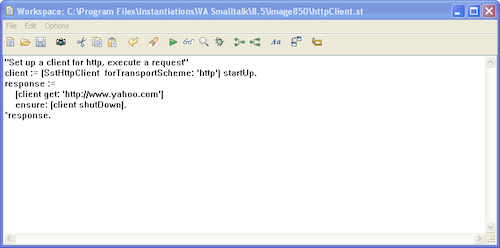
Here's the code:
"set up a client for http requests and execute a request"
client := (SstHttpClient forTransportScheme: 'http') startUp.
That sets up a client for usage. Notice that we needed to specify http (you could also specify https - we'll get into things like proxy servers in the future). next, you issue the request. Once you've "started" the client, you can continue to issue requests:
response := client get: 'http://www.yahoo.com'.
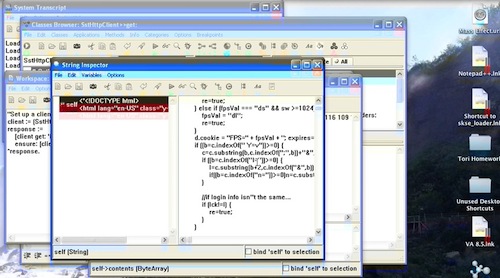
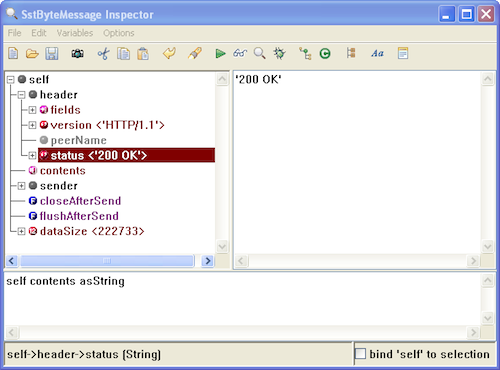
if you inspect the result, you'll see the full response object:
To get the content, simply send #asString to that piece of the response.
Finally, when you are finished with the client, shut it down:
client shutDown.
Need more help? There's a screencast for other topics like this which you may want to watch. Questions? Try the "Chat with James" Google gadget over in the sidebar.
Today's Smalltalk 4 You looks at generating accessors with the VA Smalltalk toolset. If you have trouble viewing it here in the browser, you can also navigate directly to YouTube. To watch now, click on the image below:
If you have trouble viewing that directly, you can click here to download the video directly. If you need the video in a Windows Media format, then download that here.
You can also watch it on YouTube:
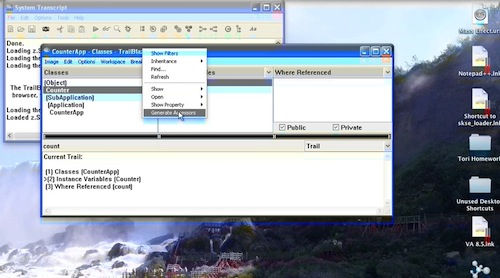
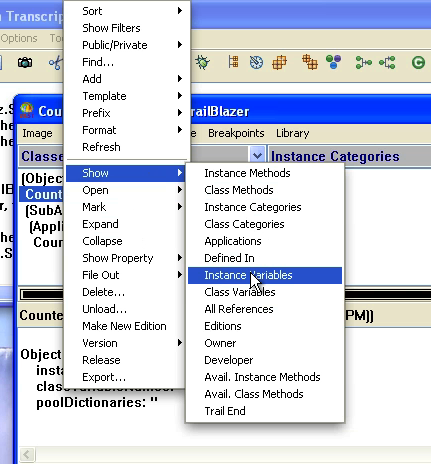
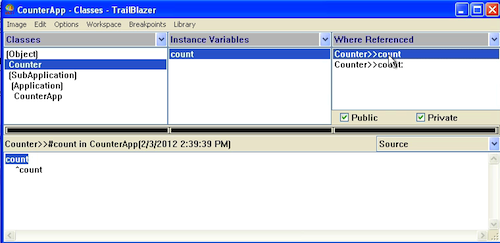
Today we'll take a look at something you need to do all the time in Smalltalk - generate accessor methods. In VA Smalltalk, you'll want to switch to the Trailblazer browsers to do that (see this tutorial for more on that). To start with, select your class in the browser, and then pop up the context menu - pick Show>>Instance Variables:
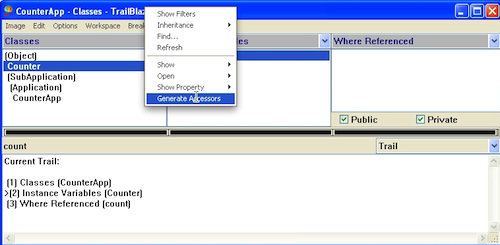
Next, select one of the variables, and use the context menu again:
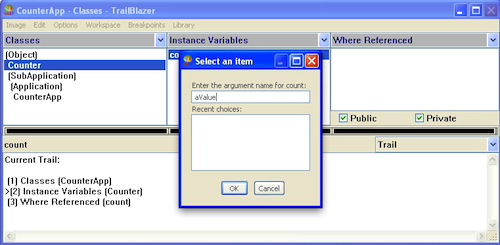
For each one selected, you'll get prompted for the name of the argument for the setter method:
And that's it - you now have accessing methods:
Need more help? There's a screencast for other topics like this which you may want to watch. Questions? Try the "Chat with James" Google gadget over in the sidebar.
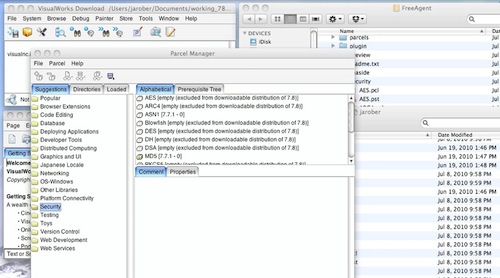
Today's Smalltalk 4 You looks at using the (no longer included) encryption libraries in VW 7.8 NC. To do that, you'll need to have a copy of VW 7.7.1 installed, so that you can copy the relevant libraries over. If you have trouble viewing it here in the browser, you can also navigate directly to YouTube. To watch now, click on the image below:
If you have trouble viewing that directly, you can click here to download the video directly. If you need the video in a Windows Media format, then download that here.
Today's Smalltalk 4 You looks at how your application can read the command line that started VA Smalltalk. If you have trouble viewing it here in the browser, you can also navigate directly to YouTube. To watch now, click on the image below:
If you have trouble viewing that directly, you can click here to download the video directly. If you need the video in a Windows Media format, then download that here.
You can also watch it on YouTube:
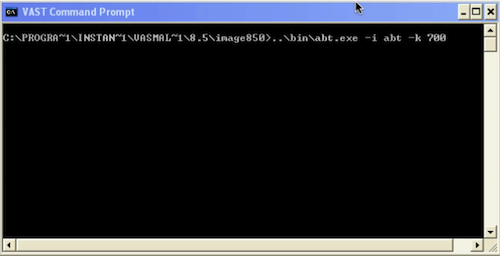
Today we'll continue looking at the command line for VA Smalltalk, focusing on reading the command line at runtime. Here's a command line with a (presumed) application argument, -k:
VA pays no attention that argument, but what if we want our application to do something with it? Simply do the following:
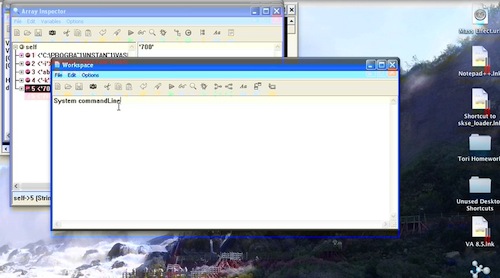
commandLine := System commandLine.
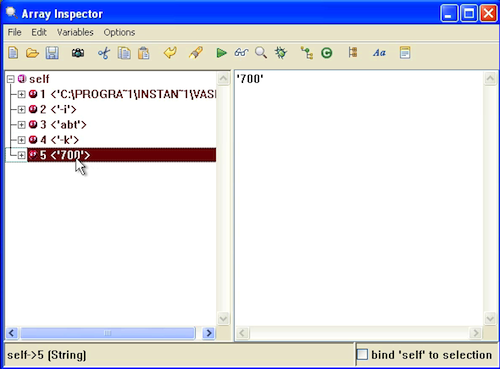
Try that in a workspace, and inspect the results - you should see something like this:
All arguments and argument names will be strings; you'll need to parse them yourself. It's pretty easy though - you can set up a simple streaming facility for that easily.
Need more help? There's a screencast for other topics like this which you may want to watch. Questions? Try the "Chat with James" Google gadget over in the sidebar.
Today's Smalltalk 4 You looks at starting VA Smalltalk up from the command line. If you have trouble viewing it here in the browser, you can also navigate directly to YouTube. To watch now, click on the image below:
If you have trouble viewing that directly, you can click here to download the video directly. If you need the video in a Windows Media format, then download that here.
You can also watch it on YouTube:
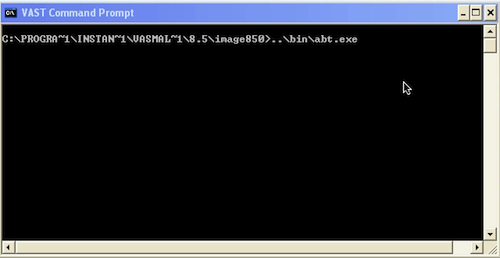
Today we'll take a look at starting VA Smalltalk from the command line. While you would normally start up your development environment from an icon or the start menu on Windows, you might deploy to Linux, or need to set up a Windows "cron" job. The simplest way to start the environment up is to just run the VM:
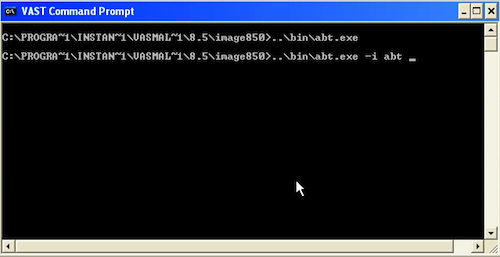
By default, the VM will look for abt.icx in the current directory, and start that. What if you want to start a different image? Use the -i argument:
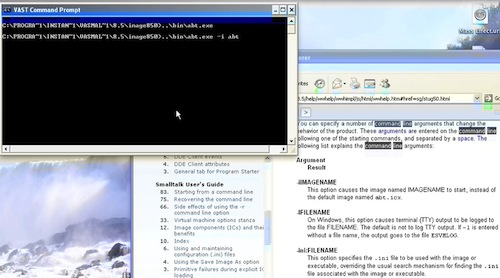
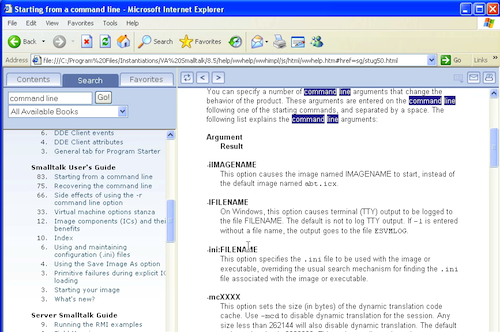
Note that we omitted the extension .icx; you need to do that, as the VM will append it itself. There are a lot of command line options you can use to control startup options (memory usage, logging - tons of stuff) - you'll want to examine the docs in detail for that:
Need more help? There's a screencast for other topics like this which you may want to watch. Questions? Try the "Chat with James" Google gadget over in the sidebar.
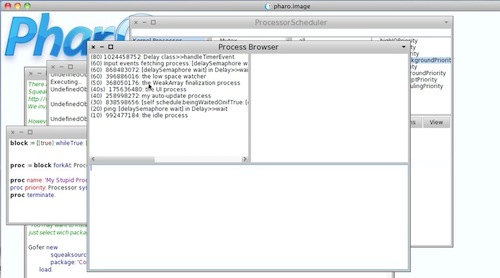
Today's Smalltalk 4 You looks at processes in Pharo - specifically, some of the tools and APIs that make working with them easier. If you have trouble viewing it here in the browser, you can also navigate directly to YouTube. To watch now, click on the image below:
If you have trouble viewing that directly, you can click here to download the video directly. If you need the video in a Windows Media format, then download that here.
Today's Smalltalk 4 You looks more deeply at the process model in Smalltalk, using VA Smalltalk as our example. If you have trouble viewing it here in the browser, you can also navigate directly to YouTube. To watch now, click on the image below:
If you have trouble viewing that directly, you can click here to download the video directly. If you need the video in a Windows Media format, then download that here.
You can also watch it on YouTube:
Today we'll take a deeper look at processes in VA Smalltalk. We'll be exploring the cooperative process model that VA (and most other Smalltalks) use. First off, we'll set up the following two processes:
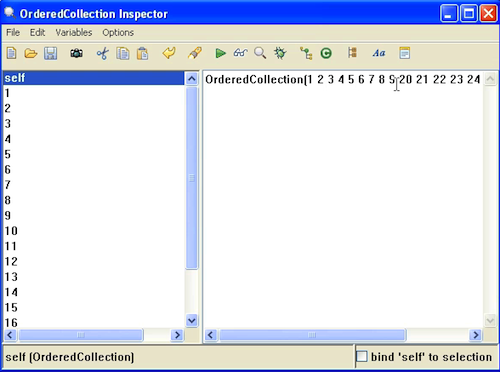
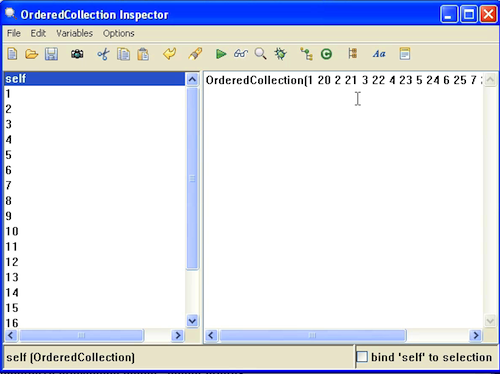
When you execute those two, and then inspect the collection, you'll see the following:
Notice that the first process ran to completion before the second one ran. That's because they were both set up at the same priority - unless one of them yields the processor (for IO, or in code purposely), the first will simply run until completion. In the normal Smalltalk process model, only a higher priority process will preempt an existing one. To get a process to yield, use the #yield message, as seen below:
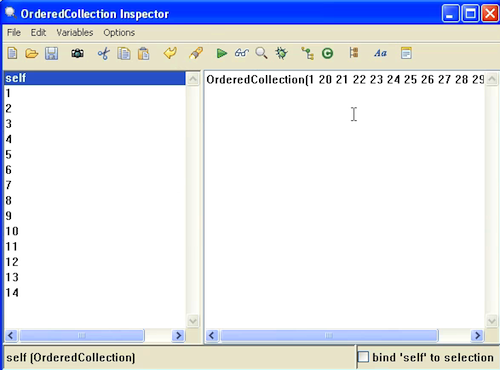
With the #yield being used, each process waits for any otter process (at the same or lower priority) to have a shot at the processor. What if one process is at a higher priority?
The Delay is used in the first process so that it doesn't run to completion before we even start executing the second process. The results are shown below:
The first process starts running, goes into a wait state (the Delay), and then never gets the processor back so long as the higher priority process runs. That's how the scheduler works in Smalltalk.
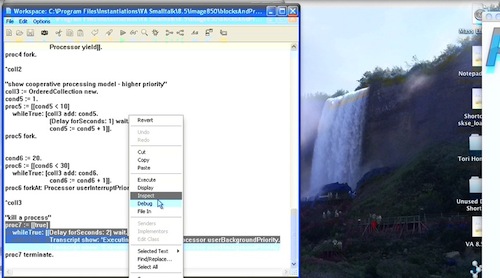
Finally, what if you have a long running process that you need to kill? Simple - use #terminate:
Need more help? There's a screencast for other topics like this which you may want to watch. Questions? Try the "Chat with James" Google gadget over in the sidebar.
Today's Smalltalk 4 You looks at automating unit tests in VisualWorks using SUnitToo. If you have trouble viewing it here in the browser, you can also navigate directly to YouTube. To watch now, click on the image below:
If you have trouble viewing that directly, you can click here to download the video directly. If you need the video in a Windows Media format, then download that here.
Today's Smalltalk 4 You looks at processes (and the process model) in Smalltalk, using VA Smalltalk as our example. If you have trouble viewing it here in the browser, you can also navigate directly to YouTube. To watch now, click on the image below:
If you have trouble viewing that directly, you can click here to download the video directly. If you need the video in a Windows Media format, then download that here.
You can also watch it on YouTube:
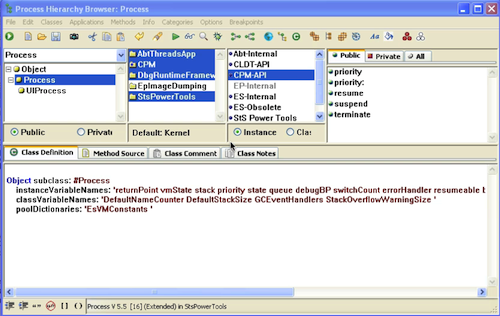
Today we'll look at processes in VA Smalltalk. That will involve looking at two classes: Process and ProcessScheduler. Class Process is displayed below:
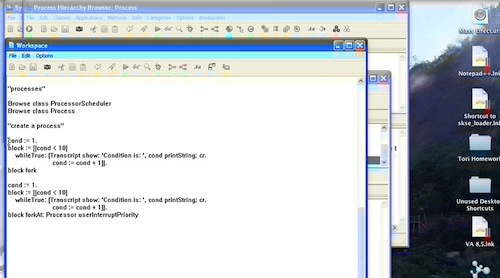
Creating a process is pretty simple - you use a Block, which we looked at in a recent tutorial. You can see the code we used to play with processes below:
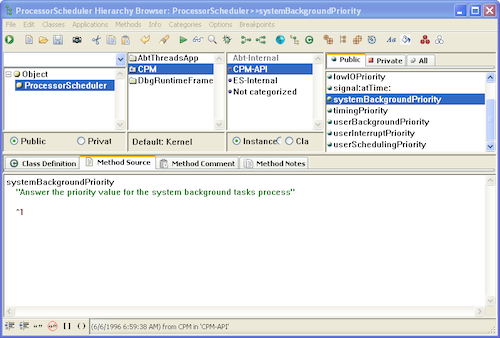
To create a process, simply encapsulate the desired code in in a block. Then, rather than executing it with #value (et. al.), fork off the process, as you can see above. In VA Smalltalk, there are 8 priority levels (ranging from 1 to 8 as numeric values) - but you should use the named levels, which you'll find in class ProcessorScheduler:
The reason you should avoid the named levels can be seen in what's happened in other Smalltalk implementations. VisualWorks originally had 8 priorities, ranging from 1 to 8. At some point, the engineering team at Cincom changed that to 100 levels, and remapped the named levels within the new range. Instantiations could do the same with VA; it's best to avoid future problems by using the API.
To see a process execute, try highlighting the code blocks above - you should end up with something like this in the Transcript:
Another thing to keep in mind - the Smalltalk process model uses green (lightweight) threads. That means that each Smalltalk process exists only within the context of the heavyweight VM process; a Smalltalk process is neither an OS level process nor an OS level thread. Additionally, the model is one of cooperative multi-tasking - processes at the same priority level will not yield to other processes of the same priority.
Need more help? There's a screencast for other topics like this which you may want to watch. Questions? Try the "Chat with James" Google gadget over in the sidebar.

 .
.
 .
.
 .
.
 .
.
 .
.
 .
.