. .

st4u

ST 4U 153: Handling Database Framework Errors in VA Smalltalk

November 2, 2011 7:55:28.136

Today's Smalltalk 4 You looks at error handling for database development in VA Smalltalk. If you have trouble viewing it here in the browser, you can also navigate directly to YouTube. To watch now, click on the image below:
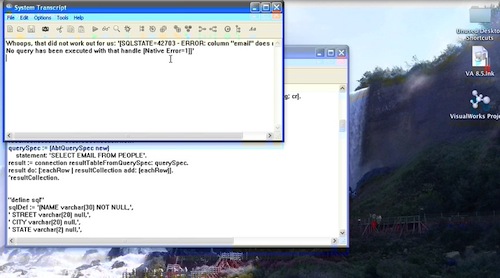
Database Errors.

If you have trouble viewing that directly, you can click here to download the video directly. If you need the video in a Windows Media format, then download that here.

You can also watch it on YouTube:


Today we'll look at setting (and unsetting) an error handler for database exceptions. In some cases, you may not want to catch all possible errors at the place they originate; you'll want a catchall handler specific to database issues. That turns out to be easy to set up in VA Smalltalk:


"set up an error handler for db work"
AbtDbmSystem activeDatabaseMgr  errorBlock: 
     [:error | Transcript show: 'Whoops, that did not work out for us: ', error errorText printString; cr].


To illustrate, let's execute a query that won't work:


"try a query that should throw an error"
resultCollection := OrderedCollection new.
querySpec := (AbtQuerySpec new)
	statement: 'SELECT EMAIL FROM PEOPLE'.
result := connection resultTableFromQuerySpec: querySpec.
result do: [:eachRow | resultCollection add: (eachRow)].
^resultCollection. 		

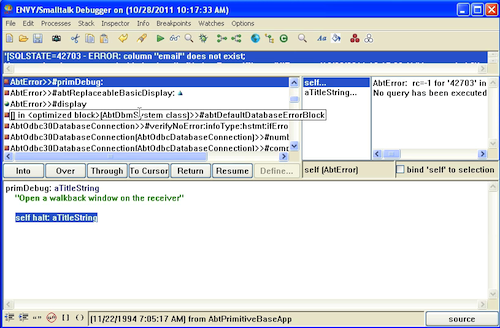
Instead of an error notifier, you get a message in the Transcript:
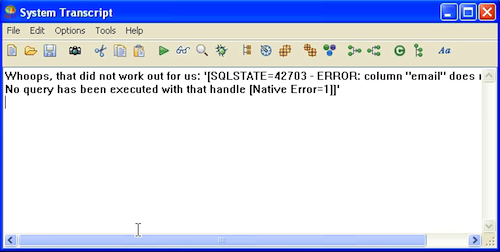
Error Handling

This can be useful when you are running a server system, and don't want a default notifier to pop up. Instead, you can log the error, and then have the system do something intelligent - quit, reset connections, whatever. If you want to reset to the default handling (for development, probably), just execute the same code with a nil argument:


"reset to default handling"
AbtDbmSystem activeDatabaseMgr  errorBlock: nil.

Now you'll see the default handling when you try that bad query:
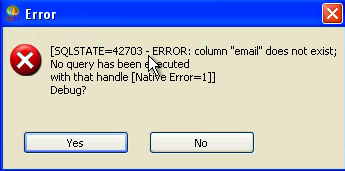
Default Error Handling

Default Error Handling

Need more help? There's a screencast for other topics like this which you may want to watch. Questions? Try the "Chat with James" Google gadget over in the sidebar.

Technorati Tags: , ,

Enclosures:
[st4u153-iPhone.m4v ( Size: 4461165 )]

posted by James Robertson

 Share Tweet This

st4u

ST 4U 152: Exception Handling in VisualWorks Smalltalk

October 31, 2011 8:50:41.732

Today's Smalltalk 4 You looks at exception handling in VisualWorks Smalltalk. If you have trouble viewing it here in the browser, you can also navigate directly to YouTube. To watch now, click on the image below:

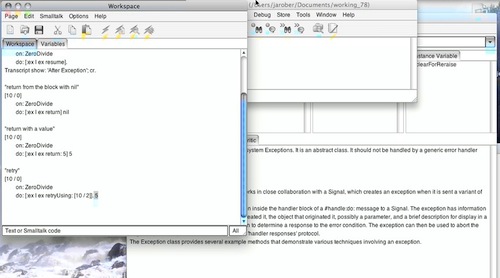
Exceptions

If you have trouble viewing that directly, you can click here to download the video directly. If you need the video in a Windows Media format, then download that here.

You can also watch it on YouTube:

Technorati Tags: , ,

Enclosures:
[st4u152-iPhone.m4v ( Size: 5236384 )]

posted by James Robertson

 Share Tweet This

st4u

ST 4U 151: Exception Handling in Pharo Smalltalk

October 28, 2011 9:49:07.221

Today's Smalltalk 4 You looks at exception handling in Pharo Smalltalk. If you have trouble viewing it here in the browser, you can also navigate directly to YouTube. To watch now, click on the image below:

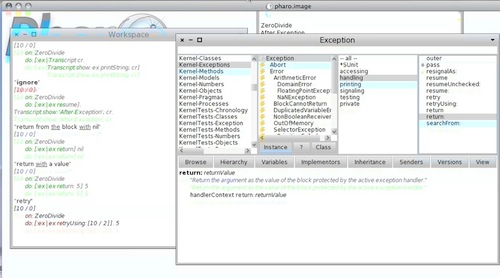
Exception Handling

If you have trouble viewing that directly, you can click here to download the video directly. If you need the video in a Windows Media format, then download that here.

You can also watch it on YouTube:

Technorati Tags: , , ,

Enclosures:
[st4u151-iPhone.m4v ( Size: 6734046 )]

posted by James Robertson

 Share Tweet This

st4u

ST 4U 150: Exception Handling in VA Smalltalk

October 26, 2011 10:15:12.086

Today's Smalltalk 4 You looks at error handling in VA Smalltalk. If you have trouble viewing it here in the browser, you can also navigate directly to YouTube. To watch now, click on the image below:

Error Handling.

If you have trouble viewing that directly, you can click here to download the video directly. If you need the video in a Windows Media format, then download that here.

You can also watch it on YouTube:


Today we'll look at error handling in VA Smalltalk - the ANS exception system, and the older, instance based signal mechanism. First, let's look at a few simple examples, using divide by zero as the source of our error:


"simple exception handling"
[10 / 0]
   on: ZeroDivide
   do: [:ex | Transcript cr.
   Transcript show: ('Error: <', ex printString, '>'); cr]. 

When the code in the block throws the exception we are looking for, the handle block executes, printing to the Transcript. You can query the exception for details as well:


"simple description"
[10 / 0]
   on: ZeroDivide
   do: [:ex | Transcript cr.
   Transcript show: ('Error: <', ex description, '>'); cr]. 		

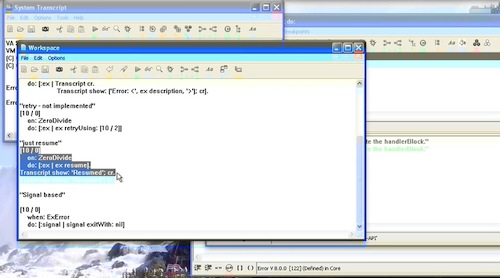
You can also resume the exception (assuming it's resumable - you need to look at the implementation of #isResumable for the exception in question):


"just resume"
[10 / 0]
	on: ZeroDivide
	do: [:ex | ex resume].
Transcript show: 'Resumed'; cr.

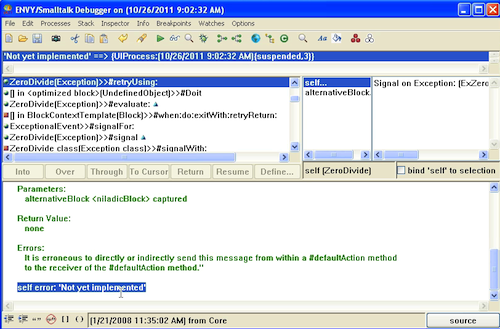
That will continue past the exception as if nothing happened. Probably not the best handling in most circumstances, but it's something you can do which comes in handy on occasion. One thing to be aware of in VA Smalltalk; not all of the ANSI spec for exceptions has been implemented. #retryUsing: does not work in VA:


"retry - not implemented"
[10 / 0]
	on: ZeroDivide
	do: [:ex | ex retryUsing: [10 / 2]]

Will yield this exception:

Retry

This will only come up if you are porting code from another Smalltalk (Pharo or VW, for instance) - when writing native VA code, this isn't really a problem. The older Signal (instance based) exception mechanism still exists in VA, and is heavily used in the libraries. Using that looks like this:


"Signal based"
[10 / 0]
	when: ExError
	do: [:signal | signal exitWith: nil]

For the most part, handlers using #when:do: will look like that, although you can, of course, customize the do block.

Need more help? There's a screencast for other topics like this which you may want to watch. Questions? Try the "Chat with James" Google gadget over in the sidebar.

Technorati Tags: , , ,

Enclosures:
[st4u150-iPhone.m4v ( Size: 6548434 )]

posted by James Robertson

 Share Tweet This

st4u

ST 4U 149: Parameterized Statements in VA Smalltalk

October 24, 2011 10:04:59.523

Today's Smalltalk 4 You looks at parameterized queries against a database using VA Smalltalk. If you have trouble viewing it here in the browser, you can also navigate directly to YouTube. To watch now, click on the image below:

Parameterized Access.

If you have trouble viewing that directly, you can click here to download the video directly. If you need the video in a Windows Media format, then download that here.

You can also watch it on YouTube:


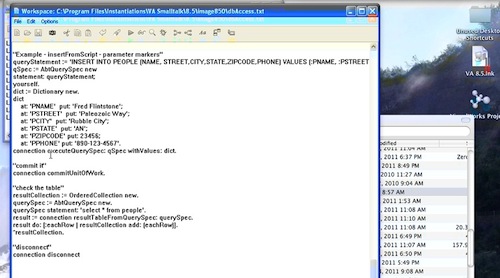
Today we'll look at parameterized queries against a relational database using VA Smalltalk - to see how to connect, please go back to this tutorial, as we are building on it here. As you probably expect, you'll need to set up a connection, and then a mapping dictionary:


"Example - insertFromScript - parameter markers"
queryStatement := 'INSERT INTO PEOPLE (NAME, STREET,CITY,STATE,ZIPCODE,PHONE) VALUES (:PNAME, :PSTREET,:PCITY,:PSTATE,:PZIPCODE,:PPHONE)'.
qSpec := AbtQuerySpec new
statement: queryStatement;
yourself.
dict := Dictionary new.
dict
	at: 'PNAME'  put: 'Fred Flintstone';
	at: 'PSTREET'  put: 'Paleozoic Way';
	at: 'PCITY'  put: 'Rubble City';
	at: 'PSTATE'  put: 'AN';
	at: 'PZIPCODE' put: 23456;
	at: 'PPHONE' put: '890-123-4567'.


If you think about that for a moment, it will become clear how easy it would be to set up a "mini framework" that maps simple objects to database tables; we have one that follows this pattern (using VisualWorks, but it's the same idea) where I work. Make sure you commit the statement:


"commit it"
connection commitUnitOfWork.

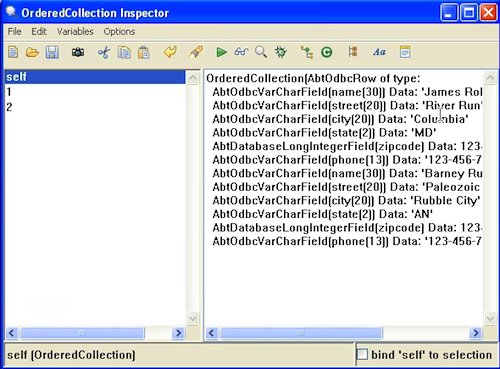
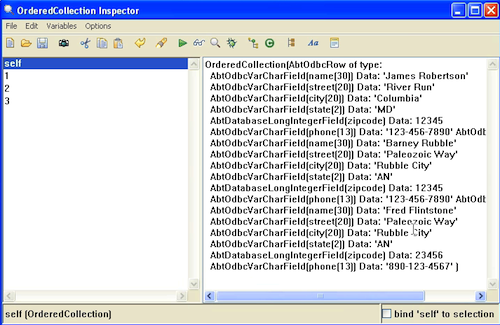
Next, look at the two screen captures - we have a query before the code above ran, and then another one after it:

Table before

Table after

Need more help? There's a screencast for other topics like this which you may want to watch. Questions? Try the "Chat with James" Google gadget over in the sidebar.

Technorati Tags: , ,

Enclosures:
[st4u149-iPhone.m4v ( Size: 4230679 )]

posted by James Robertson

 Share Tweet This

st4u

ST 4U 148: Automated Loads in VisualWorks

October 21, 2011 8:56:02.141

Today's Smalltalk 4 You looks at automated loads (from Store) using VisualWorks. I've been doing a lot of work in this area on the project I'm on at work, and I thought it might be worth sharing. If you have trouble viewing it here in the browser, you can also navigate directly to YouTube. To watch now, click on the image below:

Automated Loads

If you have trouble viewing that directly, you can click here to download the video directly. If you need the video in a Windows Media format, then download that here.

You can also watch it on YouTube:

Technorati Tags: , ,

Enclosures:
[st4u148-iPhone.m4v ( Size: 6885523 )]

posted by James Robertson

 Share Tweet This

st4u

ST 4U 147: Using SQL Directly with VA Smalltalk

October 19, 2011 8:54:10.736

Today's Smalltalk 4 You looks at direct SQL access from VA Smalltalk. It's pretty simple, so long as you remember that the API differs when you use select (as opposed to any other SQL operator). If you have trouble viewing it here in the browser, you can also navigate directly to YouTube. To watch now, click on the image below:

SQL Access.

If you have trouble viewing that directly, you can click here to download the video directly. If you need the video in a Windows Media format, then download that here.

You can also watch it on YouTube:


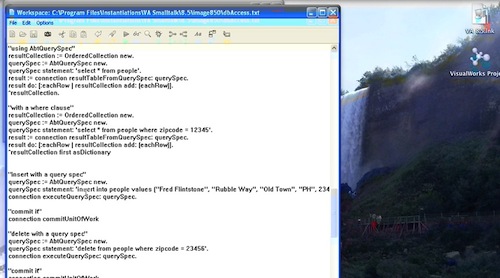
Today we'll look at accessing a relational database using direct SQL statements in VA Smalltalk - to see how to connect, please go back to this tutorial, as we are building on it here. You'll want to take a look at class AbtQuerySpec if you intend to work at this level with your database accessing. The main thing to know is this: if you are querying (using select), then you use #resultTableFromQuerySpec: If you are using any other kind of SQL statement, use #executeQuerySpec: instead. The way you utilize this is pretty simple. To query, use the following kind of code:


"using AbtQuerySpec"
resultCollection := OrderedCollection new.
querySpec := AbtQuerySpec new.
querySpec statement: 'select * from people'.
result := connection resultTableFromQuerySpec: querySpec.
result do: [:eachRow | resultCollection add: (eachRow)].
^resultCollection.

It will look the same with a where clause:


"with a where clause"
resultCollection := OrderedCollection new.
querySpec := AbtQuerySpec new.
querySpec statement: 'select * from people where zipcode = 12345'.
result := connection resultTableFromQuerySpec: querySpec.
result do: [:eachRow | resultCollection add: (eachRow)].
^resultCollection first asDictionary

To use any other SQL statement:


"insert with a query spec"
querySpec := AbtQuerySpec new.
querySpec statement: 'insert into people values (''Fred Flintstone'', ''Rubble Way'', ''Old Town'', ''PH'', 23456, ''456-7890-1234'')'.
connection executeQuerySpec: querySpec.

"commit it"
connection commitUnitOfWork

"delete with a query spec"
querySpec := AbtQuerySpec new.
querySpec statement: 'delete from people where zipcode = 23456'.
connection executeQuerySpec: querySpec.

"commit it"
connection commitUnitOfWork

That pretty much wraps it up for today - we'll look at some more examples next time.

Need more help? There's a screencast for other topics like this which you may want to watch. Questions? Try the "Chat with James" Google gadget over in the sidebar.

Technorati Tags: , , ,

Enclosures:
[st4u147-iPhone.m4v ( Size: 5910209 )]

posted by James Robertson

 Share Tweet This

st4u

ST 4U 146: Deleting from a Table using VA Smalltalk

October 17, 2011 8:21:56.897

Today's Smalltalk 4 You looks at deleting rows from a database using VA Smalltalk. We'll look at the "object" level interface to that today, and get to general use of SQL in a future screencast. If you have trouble viewing it here in the browser, you can also navigate directly to YouTube. To watch now, click on the image below:

Delete.

If you have trouble viewing that directly, you can click here to download the video directly. If you need the video in a Windows Media format, then download that here.

You can also watch it on YouTube:


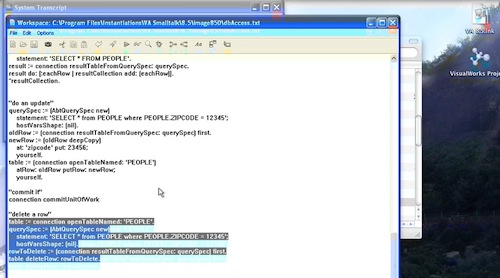
Today we'll look at deleting data from a database using VA Smalltalk - to see how to connect, please go back to this tutorial, as we are building on it here. You can do this sort of thing directly via SQL, and we'll be getting to that in another screencast. Today we'll be looking at the "object" interface for this.

Once you have a connection to your database set up (with a user who has permissions to make changes), you can delete data pretty easily. First, query the data out of the database:


"delete a row"
table := connection openTableNamed: 'PEOPLE'.
querySpec := (AbtQuerySpec new)
	statement: 'SELECT * from PEOPLE where PEOPLE.ZIPCODE = 12345';
	hostVarsShape: (nil).
rowToDelete := (connection resultTableFromQuerySpec: querySpec) first.
table deleteRow: rowToDelete.

Next, commit the work:

"commit it" connection commitUnitOfWork

Now, before we executed the delet, here's what we had from the query:

queried data

And here's what we had after the commit:

queried data

That pretty much wraps it up for today - we'll look at some more examples next time.

Need more help? There's a screencast for other topics like this which you may want to watch. Questions? Try the "Chat with James" Google gadget over in the sidebar.

Technorati Tags: , ,

Enclosures:
[st4u146-iPhone.m4v ( Size: 4045921 )]

posted by James Robertson

 Share Tweet This

st4u

ST 4U 145: Cross Platform with Pharo

October 14, 2011 15:40:27.446

Today's Smalltalk 4 You looks at the cross platform nature of Pharo (the same things apply to Squeak and VisualWorks - and VA Smalltalk supports source portability). If you have trouble viewing it here in the browser, you can also navigate directly to YouTube. To watch now, click on the image below:

Cross Platform

If you have trouble viewing that directly, you can click here to download the video directly. If you need the video in a Windows Media format, then download that here.

You can also watch it on YouTube:

Technorati Tags: , ,

Enclosures:
[st4u145-iPhone.m4v ( Size: 4187072 )]

posted by James Robertson

 Share Tweet This

st4u

ST 4U 144: Updating Rows in a Database using VA Smalltalk

October 12, 2011 9:54:58.155

Today's Smalltalk 4 You looks at updating rows in a database using VA Smalltalk. If you have trouble viewing it here in the browser, you can also navigate directly to YouTube. To watch now, click on the image below:

Update.

If you have trouble viewing that directly, you can click here to download the video directly. If you need the video in a Windows Media format, then download that here.

You can also watch it on YouTube:


Today we'll look at updating data in a database using VA Smalltalk - to see how to connect, please go back to this tutorial, as we are building on it here.

Once you have a connection to your database set up (with a user who has permissions to make changes), you can update data pretty easily. First, set up a querySpec for the data you plan to change.

First, let's execute a query to see what we have now:


resultCollection := OrderedCollection new.
querySpec := AbtQuerySpec forEntireTable: table.
result := connection resultTableFromQuerySpec: querySpec.
result do: [:eachRow | resultCollection add: (eachRow)].
^resultCollection first asDictionary

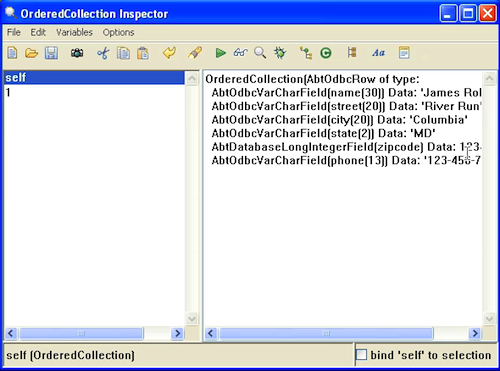
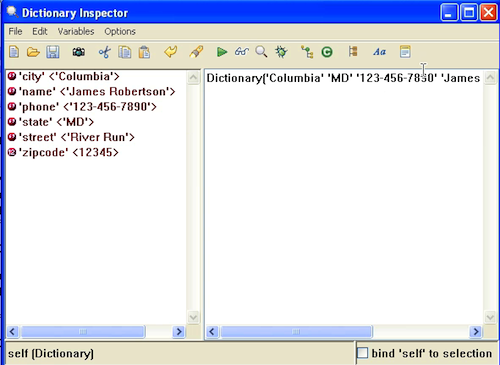
That gives us this, if we inspect the results:

Existing Data

Now let's create a query to grab the data, and change it:


querySpec := (AbtQuerySpec new)
	statement: 'SELECT * from PEOPLE where PEOPLE.ZIPCODE = 12345';
	hostVarsShape: (nil).

Now we'll do the following steps:

  • Get the data from the database
  • Update the data in Smalltalk
  • Copy the data back to the database


oldRow := (connection resultTableFromQuerySpec: querySpec) first.
newRow := (oldRow deepCopy) 
	at: 'zipcode' put: 23456;
	yourself.
table := (connection openTableNamed: 'PEOPLE')
	atRow: oldRow putRow: newRow;
	yourself.


"commit it"
connection commitUnitOfWork

Now we'll do the query again, to ensure that we have done the update:

Updated Data

That pretty much wraps it up for today - we'll look at some more examples next time.

Need more help? There's a screencast for other topics like this which you may want to watch. Questions? Try the "Chat with James" Google gadget over in the sidebar.

Technorati Tags: , ,

Enclosures:
[st4u144-iPhone.m4v ( Size: 4039980 )]

posted by James Robertson

 Share Tweet This

Previous Next (554 total)